


Splashis
Xiaomi Mini Smart Projector
Xiaomi Mini Smart Projector
Couldn't load pickup availability
Share


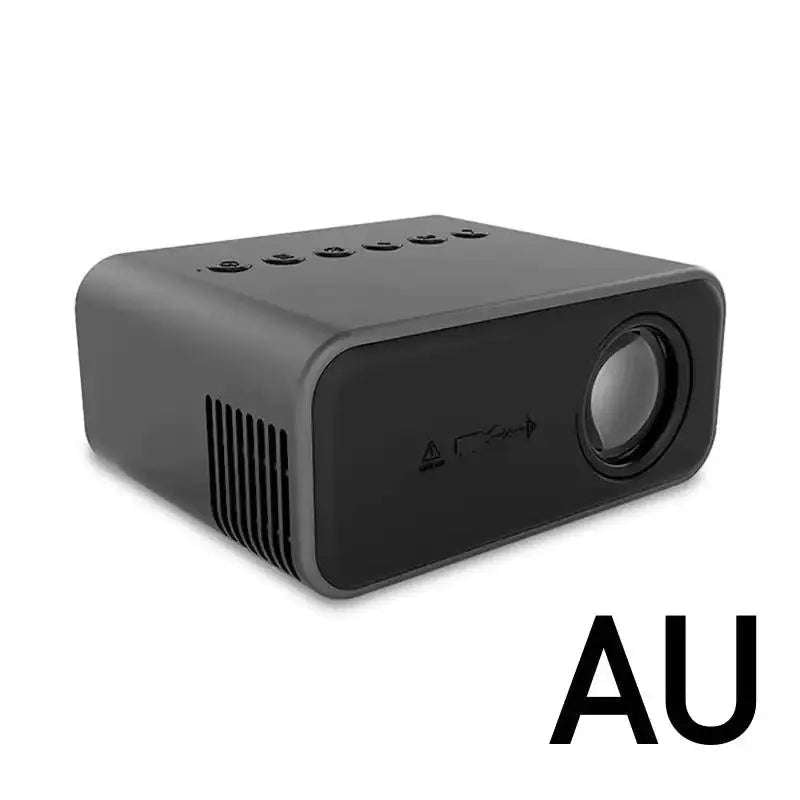
- DESRIPTION
- 📋SPECIFICATIONS
- 📦 PACKAGE INCLUDES
- 🚚 SHIPPING INFORMATION
- ❓ FAQ
Xiaomi Mini Smart Projector | Portable HD Home Theater for Movies, Gaming & Family Entertainment
Your Living Room Deserves Better Than Just a TV
Let's talk about what entertainment looks like in your home right now.
You're crowded around a 40-inch TV that cost $400+ and barely fills your field of vision. Your kids complain they can't see from the couch. Movie nights feel cramped, not cinematic. Gaming on a small screen doesn't do your new console justice. And that "home theater" you dreamed of? It requires thousands of dollars and permanent installation.
Meanwhile, you're scrolling through photos of friends with epic backyard movie nights and wondering how they pulled it off.
You've thought about projectors before, but:
- Professional ones cost $500-2,000 (ouch)
- They're huge and complicated (installation nightmare)
- Setup seems technical (you're busy enough)
- You don't want to dedicate an entire room (you need flexibility)
What if cinema-quality entertainment could fit in your hand and set up in 5 minutes?
Meet the Xiaomi Mini Smart Projector — the pocket-sized powerhouse that transforms any blank wall into a 120-inch entertainment experience for a fraction of the cost of traditional projectors.
Compact enough to fit in a drawer. Powerful enough to replace your TV. Portable enough to move from bedroom to backyard to your friend's house to your next Airbnb vacation.
HD visuals that make movie nights feel like actual events. Wi-Fi connectivity that mirrors your phone in seconds. Multiple input options that work with everything you already own—streaming sticks, gaming consoles, laptops, phones.
Kids love it (cartoons on a giant wall = magic). Parents love it (one device, endless entertainment, no permanent installation). Your wallet loves it (premium experience without premium prices).
This isn't just a projector. It's freedom. Freedom to create cinema anywhere. Freedom to entertain without limits. Freedom to transform any space into an experience.
Big-screen dreams. Small device reality. Finally.
😤 The Entertainment Limitation Struggle
| Problem | How Xiaomi Mini Projector Solves It |
|---|---|
| 📺 "My TV is too small. A 65-inch costs $800+ and still doesn't feel cinematic. Plus it won't fit in my apartment." | Project up to 120 inches for the price of a medium TV. Experience that's 3x the viewing area of a 65" TV. No wall mounting, no furniture buying, no space commitment. Rent-friendly, move-friendly, life-friendly. |
| 👨👩👧 "Family movie nights are cramped. Everyone fights over the 'good seats' and kids complain they can't see from the floor." | 120-inch projection means EVERYONE sees perfectly from anywhere in the room. No bad seats. Kids can sprawl on the floor. You can actually relax on the couch. Movie night becomes an event, not a squint-fest. |
| 💸 "Professional projectors cost $1,000-3,000. Home theater installation is even more. I want cinema experience without second mortgage." | Premium projection experience for under $180. No installation costs. No electrician needed. No dedicated theater room required. Cinema magic at realistic prices. ROI after 3-4 movie theater trips with the family. |
| 🏠 "I live in an apartment/small space. I can't dedicate an entire room to a home theater setup." | Ultra-compact (4.3" × 3.5" × 2"). Stores in a drawer. Set up in living room for movies, move to bedroom for relaxing, take to backyard for parties, pack for vacation. One device, infinite locations. Space-saving entertainment. |
| 🎮 "Gaming on a small screen doesn't do my PlayStation/Xbox justice. I want IMMERSIVE but can't afford a giant gaming monitor." | Connect console via HDMI. Game on 100+ inch display. Full immersion. Your racing games feel faster. Your adventure games feel bigger. Your friends are jealous. Your K/D ratio mysteriously improves (we can't prove causation but...). |
| 🧸 "Screen time for kids is a battle. They huddle around iPads or fight over TV positioning. I want family-friendly entertainment." | Transform screen time into shared experience. Kids can watch from anywhere, no eye strain from being too close. Cartoons become events. Educational content becomes engaging. Parents can supervise easily from couch. Kid-safe soft light projection. |
| ⚙️ "Tech setup intimidates me. Complicated wiring, settings, compatibility issues... I just want something that WORKS." | Literally plug-and-play. Power on. Connect phone via Wi-Fi mirroring OR plug in streaming stick OR connect HDMI device. Start watching. Setup time: 5 minutes max. Your tech-phobic uncle could figure this out. |
| ✈️ "I travel for work or take family trips. Hotel TVs are terrible and kids get bored in rentals." | Fits in carry-on luggage. Weighs practically nothing. Hotel wall → instant entertainment. Airbnb → movie night. Camping (with portable power) → outdoor cinema. Your entertainment travels with you. |
✨ Features That Transform Your Entertainment Experience
| Feature | Real-World Benefit (What This ACTUALLY Means for Your Life) |
|---|---|
| 🎬 HD Visual Quality | Crystal-clear picture that makes streaming content, movies, and games look vibrant and engaging. No pixelation, no blurriness. Colors pop. Details visible. Your content looks the way creators intended, not washed out like cheap projectors. |
| 📐 Up to 120-Inch Projection | That's 10 FEET of diagonal viewing area. For context, a 65" TV is 5.5 feet. You're getting nearly DOUBLE the viewing size. Everyone in the room sees perfectly. True cinema scale. Guests are always impressed. Your space becomes THE gathering spot. |
| 📦 Ultra-Compact Portable Design (110×90×50mm) | Smaller than a lunchbox. Lighter than a laptop. Fits in one hand. Store anywhere—drawer, shelf, closet. Move from room to room in 2 seconds. Take to friend's house. Pack for vacation. No commitment, maximum flexibility. Entertainment on demand, anywhere. |
| 📡 Built-in Wi-Fi Connectivity | Mirror your phone to the big screen in 30 seconds. iPhone or Android—both work. No cables. No adapters. No tech degree required. Kids' YouTube → projected. Your Netflix → projected. Family photos → slideshow on the wall. Wireless freedom. |
| 🎮 Multiple Input Options (HDMI/USB) | Works with literally EVERYTHING. Fire Stick? Yes. Roku? Yes. Chromecast? Yes. PlayStation? Xbox? Yes and yes. Laptop? USB drive with movies? DVD player? All yes. If it outputs video, this projects it. Universal compatibility = no limitations. |
| 🤖 Android-Compatible System | Supports external Android streaming devices seamlessly. Fire TV Stick, Chromecast with Google TV, etc. Access Netflix, Hulu, Disney+, YouTube, Prime Video—all the streaming services you already pay for. Your subscriptions, amplified. |
| 👶 Kid-Friendly Soft Light | Unlike harsh TV backlight, projector's reflected light is gentler on developing eyes. Kids can watch longer without eye strain (within reason, parents—still enforce screen time limits!). Plus, no glass screen = no worrying about toys being thrown at expensive TV. |
| 🎚️ Adjustable Projection Size | Want 60 inches for bedroom? Move closer to wall. Want 120 inches for party? Move back. YOU control the size based on room and mood. Flexibility that fixed TVs can't match. Same device, scalable experience. |
| 🔇 Quiet Operation | Cooling fan is whisper-quiet. No distracting noise during quiet movie scenes or dialogue-heavy shows. Subtle enough for bedtime stories projected on ceiling. You hear your content, not the device. |
| 🎮 Low Input Lag | Responsive enough for gaming. No noticeable delay between controller input and screen action. Casual gaming absolutely works. (Competitive esports players might want specialized equipment, but for 95% of gaming? This delivers.) |
| 🌡️ Efficient Cooling System | Built-in ventilation prevents overheating during extended use. Binge-watch entire season? No problem. All-day gaming? Device stays cool. Reliability you can count on for marathon viewing sessions. |
| 🎨 Automatic Keystone Correction | Compensates for angled projection. Don't have projector perfectly perpendicular to wall? It auto-adjusts image to look rectangular, not warped. Less fuss, better results. Setup flexibility without quality sacrifice. |
| 🔋 Energy Efficient |
Uses significantly less power than large TVs. Lower electric bill. Eco-friendly entertainment. Guilt-free movie marathons. Your wallet and the planet both approve. |
🎬 Real-Life Integration: Your New Entertainment Reality
Friday Night Family Movie Ritual
The Old Way:
Kids fighting over couch spots. "I can't see!" complaints. Parents cramped in corners. Movie feels small and unspecial. Everyone on phones halfway through because they're not engaged.
The Xiaomi Way:
6:30 PM: Set projector on coffee table. Point at living room wall. Connect Fire Stick. Kids spread blankets on floor with perfect view. Parents relax on couch. 100-inch Disney movie starts. Popcorn bowls everywhere. Nobody checks phones—too engaged. THIS feels like an event. Kids ask "can we do movie night again tomorrow?" (You created a tradition, not just killed 90 minutes.)
The Magic: Shared experience. Actual engagement. Memories made.
Gaming Session Transformation
Before:
You and friends huddled around 50-inch TV. Can't see enemy details in distance. Split screen multiplayer is tiny boxes of frustration.
After:
Projector connected to PlayStation. 120-inch display. Racing game feels like actual racing. Your peripheral vision is FULL of game. Friends lose their minds first time they see it. Suddenly you're hosting every game night. Your apartment becomes headquarters.
The Win: Gaming goes from activity to EXPERIENCE. Your console investment finally justified.
Bedtime Stories Reimagined
Typical Routine:
Reading books to kids while they fidget. Trying to show pictures while holding book at awkward angle. Losing their attention to tablets.
Projector Solution:
YouTube "bedtime stories" or audiobook videos projected on ceiling while kids lie in bed. Calming visuals (stars, nature scenes) accompany stories. Volume low. Lights dim. Kids mesmerized and actually winding down. Sleep comes easier. You don't have to re-read same book for 47th night.
Parent Sanity Level: Significantly improved.
Work-From-Home Presentation Upgrade
Zoom Calls:
Previously: Sharing screen on laptop, hoping clients can read your tiny shared window.
Now: Connect laptop to projector. Position it behind your desk. During presentations, your slides display on wall behind you (or beside you). Clients see YOU professionally presenting, not just a floating head next to slides. Production value increase = professionalism increase = deals closed.
Career Impact: Looking like you invested in studio setup (you spent $150 and 5 minutes).
Backyard Summer Movie Nights
Your Outdoor Space:
String up white sheet between trees. Set projector on table. Connect streaming stick. Invite neighbors. Lawn chairs, blankets, bug spray, summer blockbuster on massive outdoor screen.
Result: You're the cool house on the block. Kids' friends beg to come over. Adults bring wine and snacks. Community building through shared entertainment. Your yard becomes the neighborhood theater. Summer highlight reel material.
Hotel Room Entertainment Survival
Business Travel:
Another generic hotel room. Work conference tomorrow. Nothing on cable TV interests you. Laptop screen feels isolating.
Travel Hack: Xiaomi projector (fits in carry-on). Project Netflix on hotel wall from bed. 80-inch screen in otherwise boring room. Your favorite shows, massive scale, comfortable viewing. Hotel stays become tolerable. You look forward to evening downtime instead of dreading boredom.
College Dorm Social Hub
Tiny Dorm Room:
Can't fit TV. No space anyway. Want to be social but nothing to do.
Projector Life: Mount on shelf or desk. Project on wall or ceiling. Becomes THE room people gather in. Movie nights, game tournaments, study break YouTube sessions, sports viewing parties. Your room = popular hangout. Friendships formed. College experience enhanced.
Hidden Benefit: Actually making connections instead of isolated Netflix alone.
Rainy Day Kids' Entertainment
Stuck Inside:
Kids bouncing off walls. Parents losing sanity. TV not cutting it. Tablets creating zombie children.
Engagement Solution: Project educational content, sing-along videos, or kid shows BIG on wall. Suddenly it's special. Living room → theater. Kids actually pay attention. You get 90 minutes of peace. Use wisely (housework, meal prep, sanity recovery).
Date Night at Home
Romance on Budget:
Can't afford $100 dinner + $30 movie tickets every week.
Atmosphere: Projector in bedroom or living room. Romantic movie. Homemade dinner. Wine. Dim lights. 100-inch projection. Cozy blankets. Date night costs $20 for food, feels like $150 experience. Relationship quality time without draining bank account.
Relationship Investment: Priceless. Actual cost: Minimal.
💖 Why Xiaomi Mini Projector Becomes Your Favorite Purchase
✅ Entertainment Freedom
Watch anywhere. Bedroom tonight. Living room tomorrow. Friend's house Friday. Camping next month. Hotel next quarter. Your content, any location. No being chained to one TV in one room.
✅ Space Savings
No 65" TV dominating your wall. No entertainment center furniture. No HDMI cable management nightmare. One small device in drawer = complete entertainment system. Minimalist living, maximum experience.
✅ Cost Efficiency
$150 projector vs $800 large TV. Save $650 upfront. Plus: Family of 4 going to movies once monthly = $60+ per trip. Stay home with projector? Free. ROI in 3-4 months of skipped movie theater trips.
✅ Social Magnet
Your place becomes THE gathering spot. Friends want to come over. Neighbors ask about movie nights. Kids' friends beg for sleepovers. You're suddenly the popular house. Community builds around shared experiences.
✅ Parenting Tool
Educational content becomes engaging when BIG. Kids actually focus on nature documentaries, space shows, history content when it's immersive. Sneaky learning through entertainment upgrade.
✅ Flexibility
Mood change? Move it. Redecorating? No TV to remount. Moving apartments? Throw in box. Traveling? Take it. Life changes, projector adapts. Fixed TVs can't compete.
✅ Nostalgia with Modern Tech
Remember drive-in movies? Outdoor theater magic? That childhood wonder? You're recreating it with modern convenience. Kids experience what you experienced. Generational connection through shared awe.
✅ Eye Comfort
Projected light (reflecting off wall) is gentler than direct TV backlight. Less eye strain during extended viewing. Optometrists actually prefer projection for this reason. Comfort matters during 3-hour movie marathons.
✅ Conversation Starter
Every guest asks about it. "How much was that?" "Where'd you get it?" "Is setup hard?" You become the tech-savvy friend who has cool stuff. Recommendation requests follow. You're now an influencer (kind of).
✅ Future-Proof Investment
Works with whatever streaming service/device comes next. Not locked into proprietary smart TV systems that become obsolete. Plug in new streaming stick = instant update. Longevity built in.
📖 How to Set Up & Use Your Xiaomi Mini Projector
Initial Setup (10 Minutes, Seriously)
Step 1: Unbox
- Remove projector, remote, power adapter, manual
- Remove protective films
- Insert batteries in remote (usually included or specified)
Step 2: Positioning
- Place on stable surface (coffee table, nightstand, stack of books, tripod if you have one)
- Point toward blank wall (white/light-colored walls work best)
- Position 3-10 feet from wall (closer = smaller image, farther = bigger image)
- Height roughly eye-level when seated (or ceiling-aimed for bedtime viewing)
Step 3: Power On
- Plug power adapter into projector
- Plug into wall outlet
- Press power button (on device or remote)
- Wait 10-15 seconds for boot-up
Step 4: Focus & Adjust
- Manual focus ring (usually on top or front)—twist until image is sharp
- If image is tilted/trapezoid, use keystone buttons to square it up
- Adjust projector position or distance for desired screen size
You're ready to connect content!
Connection Methods (Choose Your Adventure)
Method 1: Streaming Stick (Easiest for Most People)
Best For: Netflix, Hulu, Disney+, YouTube, Prime Video, etc.
- Plug Fire TV Stick / Roku / Chromecast into HDMI port on projector
- Power on streaming stick (usually via USB power from projector or separate plug)
- Follow stick's on-screen setup (connect to your Wi-Fi, sign into apps)
- Start streaming
Why This Rocks: Access ALL your streaming services. No phone required. Remote control for everything. Most popular method.
Method 2: Phone/Tablet Mirroring (No Cables!)
Best For: YouTube, photos, videos on your phone, quick sharing
iPhone/iPad:
- Ensure phone and projector on same Wi-Fi network
- Swipe down to Control Center
- Tap "Screen Mirroring"
- Select "Xiaomi Projector" from list
- Your phone screen appears on wall!
Android:
- Ensure phone and projector on same Wi-Fi
- Open Settings → Connected Devices → Cast
- Select projector name
- Start mirroring
Pro Tip: Show vacation photos, YouTube videos, TikTok compilations, family videos—all instant big-screen.
Method 3: HDMI Direct Connection
Best For: Laptops, gaming consoles, Blu-ray players, cable boxes
- Connect HDMI cable from device to projector's HDMI port
- Turn on source device
- Projector usually auto-detects signal (or press "Source" button to select HDMI)
- Play!
Gaming: PlayStation/Xbox → HDMI → Projector → Massive gaming screen
Laptop: Computer → HDMI → Projector → Presentations, movies, work
Method 4: USB Drive (Direct Play)
Best For: Downloaded movies, home videos, photo slideshows
- Load videos/photos onto USB flash drive
- Insert USB into projector's USB port
- Navigate using remote to select files
- Play directly without needing another device
Travel Hack: Load kids' movies on USB before trip. No Wi-Fi needed in hotel/rental.
Daily Use Tips
For Movies:
- Dim or turn off room lights (darker = better picture)
- Close curtains if daytime use
- Position seating 1.5-2x the screen width away for optimal viewing
- Connect external Bluetooth speaker for better audio (optional but recommended)
For Gaming:
- Use HDMI for lowest lag
- Sit slightly closer for immersive experience
- Medium brightness setting often best balance
For Kids:
- Lower brightness for eye comfort
- Position so kids aren't between projector and wall (shadows!)
- Set timer for screen time limits (stay strong, parents)
Maintenance (Keep It Running Great)
Every Use:
- Let cool for 2-3 minutes before unplugging (extends lamp life)
- Power off properly via button (don't just yank plug)
Monthly:
- Wipe lens gently with microfiber cloth
- Check vents aren't blocked by dust
- Wipe exterior with soft cloth
Storage:
- Keep in cool, dry place
- Don't store with heavy items on top
- Original box is great for travel protection
Troubleshooting Common Issues
No Image?
- Check power connection
- Verify correct input source selected (HDMI vs USB)
- Ensure lens cap removed (yes, this happens)
Blurry Image?
- Adjust manual focus ring
- Check projection distance (too close or too far?)
- Clean lens
Trapezoid/Tilted Image?
- Use keystone correction buttons
- Adjust projector angle/position
No Sound?
- Check source device volume (phone, stick, console)
- Verify HDMI connected properly
- Try external speakers via audio jack
👥 This Projector is PERFECT For
| Perfect For | Why They'll Love It | |
|---|---|---|
| 👨👩👧 | Families with Kids | Transform screen time into family time. Everyone sees perfectly. Movie nights become traditions. Educational content engages. |
| 💼 | Remote Workers | Professional presentations from home office. Impress clients. Look like you invested in studio setup (you didn't). |
| 🎮 | Gamers | Massive immersive gaming. 120-inch display beats any monitor. Friends jealous. Your place becomes HQ. |
| 🏠 | Apartment Dwellers | No space for big TV? No problem. Portable, compact, renter-friendly. No installation or damage to walls. |
| 🎓 | College Students | Dorm room theater. Study group presentations. Gaming tournaments. Social hub creation. All in tiny space. |
| ✈️ | Frequent Travelers | Hotel entertainment upgrade. Fits in carry-on. Creates home comfort anywhere. Business trips less boring. |
| 🎬 | Movie Enthusiasts | Cinema experience at home. Fraction of cost. Unlimited movies. No sticky floors or $15 popcorn. |
| 🏋️ | Fitness Lovers | Project workout videos BIG. Follow along easier. Home gym upgraded. Peloton-style classes, YouTube trainers, all massive. |
| 👴 | Seniors | Larger display = easier viewing. No squinting. Comfortable from any seat. Gentle on eyes. Simple setup. |
| 🏕️ | Outdoor Enthusiasts | Backyard movie nights. Camping entertainment. RV enhancement. Tailgate parties. Outdoor gatherings elevated. |
| 🎁 | Gift Givers | Impressive gift that gets used constantly. Perfect for any occasion. Recipients rave about it for months. |
| 💑 | Couples | Date nights at home. Romantic movies. Cozy atmosphere. Saves money vs theater. Quality time together. |
| 🏡 | Homeowners | Backyard theater. Basement entertainment. Bedroom luxury. Versatility across multiple rooms. |
| 📚 | Teachers/Educators | Home tutoring presentations. Engage students visually. Online teaching enhancement. Educational content display. |
| 🎉 | Party Hosts | Sports viewing parties. Game day central. Karaoke nights. YouTube party playlists. Everyone sees perfectly. |
| Specification | Details |
|---|---|
| Brand | Xiaomi (Trusted Global Electronics Leader) |
| Product Type | Mini Smart Projector / Portable Home Theater |
| Display Technology | LED Projection |
| Native Resolution | HD-Ready (Supports 1080p Input) |
| Maximum Projection Size | Up to 120 inches diagonal |
| Recommended Projection Size | 40-100 inches (optimal brightness) |
| Projection Distance | 1-3 meters (3-10 feet) for optimal viewing |
| Brightness | Optimized for dark/dim rooms, bedrooms, evening use |
| Contrast Ratio | High contrast for vivid colors and deep blacks |
| Aspect Ratio | 16:9 (Standard widescreen) |
| Connectivity | Wi-Fi (Screen Mirroring), HDMI, USB |
| Wireless Mirroring | iOS and Android compatible |
| Operating System | Compatible with Android streaming devices |
| Supported Formats | Video: MP4, AVI, MKV, MOV |
| Audio Output | Built-in speaker + 3.5mm audio jack for external speakers |
| Input Ports | HDMI × 1, USB × 1, Audio Out × 1 |
| Power Source | AC Adapter (included) |
| Power Consumption | Energy-efficient LED (approx. 30-50W) |
| Lamp Life | 20,000+ hours (years of use) |
| Cooling | Advanced heat dissipation system, quiet fan |
| Keystone Correction | Automatic ±40° adjustment |
| Focus | Manual focus adjustment |
| Remote Control | Included (IR remote) |
| Dimensions | 110 × 90 × 50 mm (4.3" × 3.5" × 2") |
| Product Weight | Lightweight (approx. 400g / 0.88 lbs) |
| Color | Sleek Gray |
| Suitable Environments | Bedrooms, living rooms, kids' rooms, dorms, offices, travel |
| Best Use | Evening/night viewing, indoor entertainment, family movies, gaming |
| Item | Description | |
|---|---|---|
| 📽️ | Xiaomi Mini Smart Projector | Main unit with 110,000 RPM motor, HD projection, Wi-Fi connectivity |
| 🔌 | AC Power Adapter | Universal US plug, included power cable |
| 🎮 | Infrared Remote Control | Full-function remote for easy navigation and control |
| 📖 | User Manual | Complete setup guide in English with troubleshooting tips |
| Shipping Detail | Information | |
|---|---|---|
| 💰 | Shipping Cost | ✅ FREE SHIPPING |
| ⚙️ | Estimated Processing Time | 📋 0–1 Business Days |
| 📦 | Estimated Delivery Time | 🚚 1–4 Business Days |
⚡ We process orders fast because we know you need NOW — not next month.
Q: Can I watch Netflix, Hulu, or Disney+ on this?
A: Yes. The easiest way is to plug in a streaming stick like an Amazon Fire Stick, Roku, or Chromecast into the projector's HDMI port.
Q: How do I connect my phone to it?
A: You can connect wirelessly via Wi-Fi screen mirroring. For iPhones, use the "Screen Mirroring" feature, and for Android, use the "Cast" or "Smart View" feature.
Q: Is it battery-powered and wireless?
A: No, this projector does not have a built-in battery. It needs to be plugged into a wall outlet with the included AC power adapter to operate.
Q: Can I use it during the day or in a bright room?
A: This projector performs best in dark or dimly lit rooms. It is not bright enough for clear viewing in direct sunlight or a brightly lit room.
Q: Can I connect my PlayStation, Xbox, or Nintendo Switch?
A: Yes, you can connect any gaming console using a standard HDMI cable for a massive gaming screen.
Q: Is the built-in speaker loud enough? Can I connect external speakers?
A: The built-in speaker is fine for casual viewing. For a more cinematic experience, we highly recommend connecting external speakers or a soundbar via the 3.5mm audio jack.
Q: How large of a screen can I project?
A: You can project an image up to 120 inches (10 feet). For the best brightness and clarity, a screen size of 40-100 inches is recommended.
Q: Do I need to buy a special projector screen?
A: No, you don't. A plain, light-colored wall works perfectly as a screen.
Q: How do I get the picture to be a perfect rectangle if the projector is at an angle?
A: The projector has automatic keystone correction, which will automatically adjust the image to be rectangular, making setup much easier.
Q: Is the fan loud?
A: No, the cooling fan is designed to be whisper-quiet so it won't distract you from what you're watching.
Q: How long does the projector's bulb last?
A: The LED lamp has a lifespan of over 20,000 hours, which means you can watch a 2-hour movie every single day for more than 25 years.
Q: Is it complicated to set up?
A: Not at all. Setup takes less than 5 minutes. Just plug it in, point it at a wall, connect your device (like a Fire Stick), and use the focus ring to make the image sharp.
Q: What is the true picture quality? Is it 1080p?
A: It is an HD-Ready projector that supports 1080p input. This means it delivers a clear, vibrant picture perfect for movies and casual gaming, especially in a dark room.
Q: Can I mount it to the ceiling or a tripod?
A: The projector is designed primarily for tabletop use, but it may have a standard tripod mount on the bottom (check the specific model). It is not designed for ceiling mounting.
Q: Can it play movies directly from a USB drive?
A: Yes, you can load movie files onto a USB flash drive, plug it into the projector's USB port, and play them directly.
